From SFTP to Sitecore: Automating Daily XML Imports with Azure
Written by Hemapriya Senthilkumar October 2026

In many Sitecore implementations, website content needs to be regularly updated using data received from external systems. In one of our projects that meant multiple XML files arriving daily over SFTP. This is how we automated the import without duplicating logic that already existed.
Introduction
In many Sitecore implementations, website content needs to be regularly updated using data received from external systems.
In one of our Sitecore projects, we had a requirement to process multiple XML files delivered by an external system through Secure File Transfer Protocol (SFTP) and use the data to create or update content in Sitecore.
To automate this process, we integrated Azure Blob Storage, a scheduled pipeline, and a custom Sitecore API. This allowed us to execute the XML import at a predefined time every day without manual intervention.
In this article, I'll walk through how we implemented this integration by reusing Sitecore's existing scheduled task functionality.
Workflow Overview
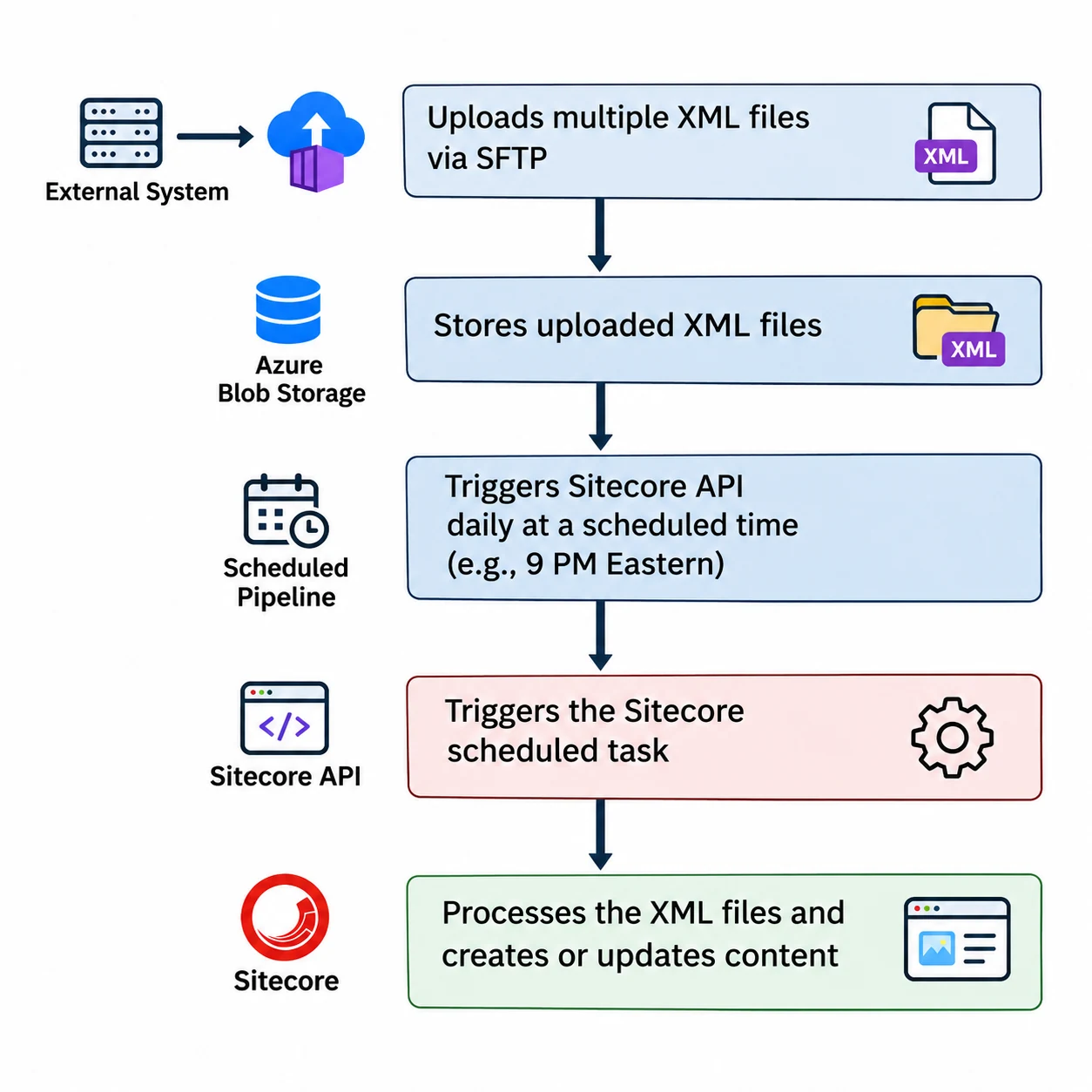
The overall workflow is as follows:
- An external system uploads multiple XML files through SFTP.
- The uploaded files are stored in Azure Blob Storage.
- A scheduled pipeline runs at a predefined time every day.
- The pipeline sends an HTTP POST request to a custom Sitecore API.
- The API triggers an existing Sitecore scheduled task.
- Sitecore validates the expected file names, processes the XML data, and updates content.
1. Uploading XML Files Through SFTP
SFTP provides a secure way to transfer files between systems.
In our implementation, the external system uploads multiple XML files to an SFTP location backed by Azure Blob Storage.
Each XML file follows a predefined naming convention based on the type of data it contains. This helps the application identify the files required for the import.
Azure Blob Storage acts as a central storage location, allowing Sitecore to access and process the files when the daily import begins.
2. Configuring the Scheduled Pipeline
Since our requirement was to process the XML files once a day, we configured a scheduled pipeline to run daily at 9 PM Eastern time.
The pipeline sends an HTTP POST request to a custom API endpoint in the Sitecore Content Management (CM) application.
API endpoint:
POST https://your-sitecore-host/XMLImport/TriggerDailyJobThe pipeline does not handle any file processing. Its responsibility is simply to trigger the Sitecore import at the configured time. This keeps the scheduling mechanism independent of the application logic.
3. Triggering a Sitecore Scheduled Task Programmatically
Sitecore provides scheduled tasks that allow developers to execute custom application logic at configured intervals. These tasks are typically configured under /sitecore/system/Tasks/Schedules.
In our implementation, the XML import logic was already available as a Sitecore scheduled task. Rather than duplicating the import functionality, we created a custom Sitecore MVC controller and registered a route that allowed the pipeline to trigger the existing task programmatically.
The core implementation is shown below:
[HttpPost]
public ActionResult TriggerDailyJob()
{
    var database = Factory.GetDatabase("master");
    var scheduleItem = database.GetItem(
        "/sitecore/system/Tasks/Schedules/XML Import/Run Import"
    );

    if (scheduleItem == null)
    {
        Log.Error("Scheduled task not found.", this);
        return new HttpStatusCodeResult(
            404, "Scheduled task not found."
        );
    }

    var jobToRun = new ScheduleItem(scheduleItem);
    Log.Info("Starting daily XML import.", this);
    jobToRun.Execute();

    return Content("Scheduled task triggered successfully.");
}
The implementation involves three main steps:
- Retrieve the configured schedule item from the master database.
- Create an instance of
ScheduleItem. - Execute the scheduled task using
ScheduleItem.Execute().
This allows us to reuse the existing import logic without introducing additional processing logic inside the API.
In our environment, the CM application was protected by IP-based access restrictions. Depending on the hosting environment, additional API authentication may be required.
4. Validating and Processing XML Files
Once the scheduled task is triggered, the import logic retrieves the uploaded files from Azure Blob Storage.
One important consideration when working with SFTP uploads is handling temporary files. Some SFTP clients use extensions such as .filepart while transferring files, and those partial files should not be picked up by the import.
To avoid processing unexpected files, the application validates the file names before proceeding with the import. A basic file extension validation can be performed as follows:
private bool IsValidXmlFile(string fileName)
{
    return !string.IsNullOrWhiteSpace(fileName)
        && fileName.EndsWith(
            ".xml",
            StringComparison.OrdinalIgnoreCase
        );
}
In addition to checking the extension, the application should verify the expected file names and validate the XML structure.
Once the required files are identified, the import logic parses the XML data and creates or updates the corresponding content items in Sitecore.
5. Benefits of This Integration
- Automation: eliminates the need to manually trigger daily content imports.
- Controlled execution: processes multiple XML files at a predefined time.
- Code reusability: reuses existing Sitecore scheduled tasks and import logic.
- Separation of responsibilities: the pipeline handles scheduling, while Sitecore handles content processing.
- Easy monitoring: import execution can be tracked through Sitecore application logs.
- Maintainability: changes to the scheduling mechanism can be managed independently of the import logic.
Conclusion
By integrating SFTP, Azure Blob Storage, a scheduled pipeline, and Sitecore scheduled tasks, we automated the daily XML import process while making use of existing functionality.
One of the key advantages of this approach is its simplicity. The pipeline handles when the import should run, while Sitecore handles how the data should be processed.
This approach can be adapted to other Sitecore implementations where content needs to be regularly synchronized with external systems through file-based integrations.
References
-
 Sitecore, Digital Experience, Technology, News
Three takeaways from Sitecore Symposium 2026
Read More
-
 Sitecore, Technology, Healthcare
Fail-Closed ‘View As’ for HR on SitecoreAI
Read More
-
Sitecore, Digital Experience, Technology
Seamless Media Management: Integrating Cloudinary with Sitecore
Read More
-
 Sitecore, Digital Experience, Technology
AEO and GEO visibility with Scrunch by Sitecore AI: three benefits that matter
Read More