Classic to Spire: What Migrating Your Configured Commerce CMS Actually Takes
Written by Lance Farquhar September 2026

Classic CMS reached end-of-life on January 1, 2025. If your Optimizely Configured Commerce storefront is still running it, migrating to Spire CMS isn't a nice-to-have anymore — it's scheduled, ticket-based, and eventually mandatory. This is what we've learned scoping, estimating, and planning that move across real implementations: what the tooling actually automates, where the real cost hides, and how to plan around both.
The 30-Second Version
- It wasn't a version bump. Spire CMS has existed as an option since the v5.1 SDK release in January 2022. Classic and Spire ran side by side for three years before Classic's retirement — the end-of-life is a policy deadline (January 1, 2025).
- Spire is where Optimizely is investing in Configured Commerce. Server-side rendering and SEO improvements, WCAG 2.0 AA accessibility, Core Web Vitals gains, and — as of mid-2026 — an AI-agent-ready storefront layer (WebMCP) have all landed in Spire. Classic has received nothing comparable in years.
- There is a conversion tool — here is what it does and doesn't do. It moves standard, published content and out-of-the-box widgets. Anything custom — your widgets, your pages, your theme — needs a developer to rewrite.
- The bottom line: for most implementations this is a bounded, estimable project, not an open-ended rebuild — provided you inventory what's actually custom before you scope it.
The Myth: "It Was a Version Upgrade"
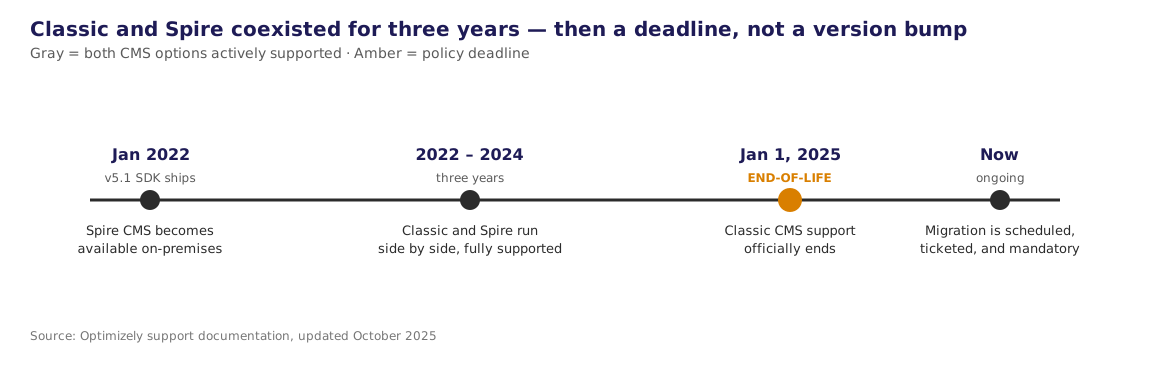
It's an easy assumption to make, and we made it too at first: Classic CMS gets replaced by Spire CMS somewhere around SDK 5.1 to 5.2, the way most Configured Commerce breaking changes arrive. It's not true, and the real sequence matters for how you plan.
Spire CMS became available to on-premises customers with the v5.1 SDK release in January 2022 (cloud customers had it slightly earlier). From that point, Configured Commerce customers could run Spire-based sites on the same instance as their existing Classic-based sites — Optimizely's own documentation frames this explicitly as parallel support, not a cutover. Every SDK release since, including the LTS upgrade instructions updated as recently as September 2025, carries parallel guidance: "use the Responsive theme... if you use the Classic CMS" alongside "build Spire using your blueprint... if you use the Spire CMS."
What actually ended Classic wasn't a version number — it was a calendar date. Optimizely's current guidance states plainly: "Because all customers can now use the Spire CMS, Classic CMS has reached its end-of-life, as of January 1, 2025." That's a support-policy decision, three years after Spire became universally available, not a technical dependency you tripped over mid-upgrade.
The practical implication: if you're still on Classic, you're not behind on a routine upgrade — you're on a platform that's stopped receiving anything, on borrowed time from a deadline that already passed for new investment. That's a different conversation to have with stakeholders than "we're due for an upgrade."
What's Actually Different Under the Hood
Optimizely's own feature-parity comparison is worth having on hand when you're scoping. The short version: Classic runs on Angular.js, styled via a Foundation-based Responsive theme, built with Grunt. Spire runs on React/Redux with TypeScript, built with Webpack, and ships as a Node front end rather than a set of theme files layered onto ASP.NET views. Widgets in Spire are constructed and extended differently — configurable, more composable, and designed to be authored with less code for standard cases — and Spire adds real CMS capabilities Classic never had: page-version comparison and restoration, flexible content tagging, a configurable style guide with revert-to-blueprint defaults, and device preview links for quick mobile/tablet/desktop checks.
None of that is decorative. It changes how your team builds and maintains the site going forward, which is exactly why Optimizely's own migration guidance frames the move as a chance to reassess your site, not just port it 1:1.
The Key Challenges
The conversion tool automates less than the name implies. Optimizely's Classic-to-Spire conversion tool exports content in Spire format from a checkbox in Classic's Import/Export modal, and imports it into Spire — but only for published content, and only for standard content pages and out-of-the-box widgets. In Optimizely's own words: "Optimizely cannot convert custom pages/widgets in the base implementation, but you and your partner have the ability to extend it." Anything custom is your problem to solve, by design, but that is what partners like Nishtech are for, to help you navigate challenges and deliver value.
Standard system pages don't convert — they regenerate. My Account, product detail pages, and other standard system pages can't be cleanly mapped from Classic to Spire, so the import tool instead offers a "Restore Initial Pages" option that recreates them as fresh Spire defaults. If you'd customized any of those pages in Classic, that customization doesn't carry over — it has to be rebuilt against the Spire version of the page.
Custom widgets and pages need real code, not configuration. To convert a custom page or widget, a developer implements IPageConverter or IWidgetConverter (Optimizely recommends extending the provided GenericPageConverter / GenericWidgetConverter base classes rather than starting from scratch), decorated with a DependencyName attribute matching the original Classic class. The shape of a widget converter looks roughly like this:
[DependencyName("YourCustomWidgetConverter")]
public class YourCustomWidgetConverter : GenericWidgetConverter
{
    public override string GetWidgetType(WidgetConvertParameter parameter)
        => "YourSpireWidgetType";

    public override string GetZone(WidgetConvertParameter parameter)
        => MapClassicZoneToSpireZone(parameter.ClassicWidget.Zone);

    public override Dictionary<string, string> GetContentModelFieldNameMapping(
        WidgetConvertParameter parameter)
        => new()
        {
            ["ClassicFieldName"] = "SpireFieldName",
            // every field your widget stores has to be explicitly mapped —
            // Classic and Spire field names don't line up automatically
        };
}
Every custom widget and page needs this treatment: a converter class, explicit field-name mapping, and explicit zone mapping (Classic's layout zones don't translate to Spire's automatically). This is the actual engineering work in a migration — the checkbox in the admin console is doing almost none of it for you.
Failures are visible, not silent — which is good, but still work. If Spire encounters a widget it doesn't know how to render after import, it shows a warning placeholder in that widget's spot rather than failing quietly. That's the right design, but it means your QA pass needs to walk every page template looking for those placeholders, not just spot-check a few.
The cutover is a scheduled, single-shot event. This isn't a deploy you run whenever you're ready. You open a ticket with Optimizely Support, schedule a migration working session, put the live site into maintenance mode, and Optimizely converts your containers to Spire against your blueprint — a process documented as taking about ten minutes, after which you import your Spire content and verify before turning maintenance mode back off. If something's wrong, Optimizely will convert the site back to Classic. Plan your internal readiness around that window, not around your own deploy cadence.
Best Practices
- Inventory customizations before you scope, not after. Catalog every custom widget, page, handler, and theme against the out-of-the-box baseline. Across the implementations we've reviewed, front-end customization depth — widget overrides, custom pages, and (for multi-brand sites) the number of distinct themes in play — is the real driver of migration cost. Back-end integration logic is largely irrelevant to this particular estimate; don't let a complex ERP integration inflate a CMS-migration number it doesn't actually affect.
- Use the conversion tool for everything standard, and stop there. Don't hand-roll converters for OOB widgets or pages the tool already handles — that's wasted effort. Reserve custom converter work for what's genuinely custom.
- Treat this as a design reassessment, not a port. Optimizely's own guidance says as much: this is a natural point to simplify a widget you'd normally have rebuilt anyway, using Spire's more configurable, lower-code widget model instead of replicating Classic's implementation exactly.
- For multi-brand or multi-theme implementations, scope per theme. A single backend can sit behind several very different Classic themes — different brands, different years' redesigns layered on top of each other. Each one needs its own Spire blueprint build; the number of themes, not the number of storefronts, is what multiplies your front-end effort.
- Validate completely in Sandbox before requesting the Production cutover. The production migration is a live, scheduled event with a maintenance window; Sandbox is where you find out what the conversion tool missed, with no customer-facing consequences.
Estimating Level of Effort
Most LOE mistakes we've seen come from estimating a Classic-to-Spire migration the way you'd estimate a general platform upgrade — by overall system complexity. That's the wrong axis. The CMS swap only touches your front end; it doesn't touch your backend integration logic at all (a pipeline handler that calls an ERP over SOAP or REST runs exactly the same whether Classic or Spire is rendering the page in front of it). A two-axis model works better:
Axis one — front-end customization depth (this is what the migration actually costs):
- Standard content and OOB widgets: near-zero — the conversion tool handles it
- Each custom widget: roughly the cost of writing and testing one converter class (field mapping plus zone mapping), which scales with how much custom state the widget carries, not with how visually complex it is
- Each custom page: similar to a widget, plus the "system pages regenerate as defaults" gotcha if it's one of the standard pages
- Theme and branding work: scales with the number of distinct themes, not the number of sites — three brands on one shared theme cost roughly what one brand does; three brands on three separate themes cost roughly three times as much
Axis two — backend integration depth (real project cost, but not migration-specific cost):
- ERP connectors, pipeline handlers, custom entities — carry this cost in your overall project budget, but don't attribute it to the CMS migration line item. It's a good excuse to regression-test that integration while you're already doing a full QA pass, but it's not new work the migration created.
A rough scoring pass — count your custom widget-category overrides (Cart, Checkout, Header, Product Details, Order History, and so on; Configured Commerce implementations tend to cluster customization into a dozen or two of these categories), your custom pages, and your theme count for multi-brand sites — gets you to a defensible estimate faster than trying to size "the whole system."
Key Deliverables for Project Planning
- Customization inventory — every custom widget, page, handler, and theme, mapped against the OOB baseline, before scoping starts
- Sandbox blueprint and conversion dry run — the new Spire blueprint built and the conversion tool run against real content, so gaps surface before Production is on the line
- Converter classes — one
IWidgetConverter/IPageConverterimplementation per custom widget or page, each with its field and zone mapping - QA/UAT plan — content parity, custom widget functionality, and template-by-template checks for the "unsupported widget" placeholder
- Cutover ticket with Optimizely Support — scheduled migration working session, a defined maintenance window, and agreed rollback criteria
- Content parity sign-off — a business-side check that what shipped in Spire actually matches what stakeholders expect, separate from the technical QA pass
How to Test It
Optimizely's own guidance for this step is basically "verify your website" — not a real test plan for a production cutover. Here's what we'd actually put in place:
- Automated end-to-end coverage with Playwright, scripting the critical paths — browse, product detail, cart, checkout, order confirmation — run against both the pre-migration Classic site and the post-migration Spire site, so you're diffing real behavior instead of eyeballing screenshots after the fact
- Visual regression snapshots per page template, per theme (this matters specifically for multi-brand implementations), using Playwright's screenshot comparison to catch the layout drift the conversion tool doesn't warn you about
- API and functional checks against anything backend integrations touch — pricing, availability, order submission — to prove the CMS swap didn't perturb integration behavior, even though it shouldn't have
- A manual content-parity pass for CMS-authored content — menus, promotional pages, marketing copy — because Playwright will tell you a page rendered, not that the content on it is right
- A rollback rehearsal. Optimizely will revert your site to Classic if the migration surfaces issues; know in advance what would actually trigger that call, rather than deciding it live during the maintenance window
What We Found Reviewing Real Implementations
We went looking at real Configured Commerce customization footprints to sanity-check the LOE model above, and the two patterns that came back were genuinely different shapes of the same problem.
One implementation carries roughly twenty distinct widget-category overrides — cart, checkout, product details, order history, user setup, and more — tightly coupled to a real ERP integration, with custom pages and handlers layered throughout. For an implementation shaped like that, migration cost is dominated by writing and testing converter classes across two dozen touchpoints: real, billable engineering work, concentrated almost entirely in the front end.
Another real implementation runs three separate consumer brands off a single shared backend, with almost no custom front-end blueprint at all — each brand's site is themed individually, with several of them carrying year-over-year theme refreshes stacked on top of each other, while nearly all the actual business logic lives in backend integration pipes that genuinely don't care what's rendering the page in front of them. For that implementation, migration cost isn't about code complexity at all — it's almost entirely about how many distinct themes have to be rebuilt as Spire blueprints, one per brand.
Neither of those implementations would estimate correctly if you sized them by "how complicated is this system." The first one's complexity is exactly where the migration cost is; the second one's complexity — a real, nontrivial SOAP-based ERP integration — is almost entirely irrelevant to the CMS migration estimate, and its actual cost driver (three themes, not three systems) wouldn't show up if you were counting lines of backend code. Count front-end surface area specifically. It's the only axis the CMS swap touches.
What This Means for You
- If you're a business stakeholder, the deadline already passed — Classic CMS stopped getting investment in January 2025, and every month since has added distance between what your storefront can do and what Spire-based competitors' storefronts can do (SEO, accessibility, and now AI-agent shopping integrations). Budget this as a scoped project with a real ROI case, not a deferred maintenance item.
- If you're a developer or architect, start with the inventory, not the SDK. The conversion tool will save you real time on standard content; your actual work is writing converters for what's custom, and the two things that most commonly get missed are standard system pages (which regenerate as defaults, not conversions) and multi-brand theme counts.
- If you're running multiple brands or themes off one backend, scope by theme count, not by brand count or backend complexity — it's the number that will actually predict your timeline.
Scoping a Classic-to-Spire migration and want a second set of eyes on the estimate before you commit to a timeline or a go-live date? That's exactly the kind of assessment Nishtech does for clients — reach out and we'll walk through your customization inventory with you.
-
 Optimizely, Ecommerce, Technology
Configured Commerce Upgrade Watch
Read More
Optimizely, Ecommerce, Technology
Configured Commerce Upgrade Watch
Read More
-
 Optimizely, Ecommerce, Technology
Running Your Configured Commerce APIs on Linux: What It Actually Takes
Read More
Optimizely, Ecommerce, Technology
Running Your Configured Commerce APIs on Linux: What It Actually Takes
Read More
-
 Digital Strategy, Optimizely, Technology, Ecommerce
Why Nishtech Is Betting on Optimizely, Shopify+ & Znode for 2026 and Beyond
Read More
Digital Strategy, Optimizely, Technology, Ecommerce
Why Nishtech Is Betting on Optimizely, Shopify+ & Znode for 2026 and Beyond
Read More
-
 Optimizely, Technology, Ecommerce
Transform Your B2B Search Experience: Why Optimizely’s Configured Commerce Search is the Upgrade Your Manufacturing Business Needs
Read More
Optimizely, Technology, Ecommerce
Transform Your B2B Search Experience: Why Optimizely’s Configured Commerce Search is the Upgrade Your Manufacturing Business Needs
Read More