Configured Commerce Upgrade Watch: September 2026 LTS
lts 5.2.2608.672+lts Covers September 2026
Written by Lance Farquhar September 28, 2026
Release 5.2.2608.672+lts, released September 24, 2026. The Long-Term Support branch rolls up four months of short-term releases and about 80 hotfixes. We checked the ones that change behavior against the source, and one of them, a new redirect allow-list, can send visitors to an error page after you upgrade.
The 30-Second Version
- What this release is: a cumulative LTS build covering the May, June, July and August 2026 STS releases plus roughly 80 included hotfixes. Optimizely lists no breaking changes or upgrade notes for this entry.
- Search resilience: if Commerce Search v3 or its Google Cloud Retail backend fails, the storefront now falls back to Elasticsearch instead of failing the search. We confirmed it in code.
- A behavior change to test: Spire now redirects to external hosts only if they are on a new allow-list or already the target of a URL Redirect. Anything else lands on the unhandled-error page.
- Reliability fixes that matter to ERP and payments teams: PayFlow Pro no longer records a malformed response as a success, a throwing Order Submit connector no longer leaves the job hanging, and the Deactivate Inactive Users job runs in batches.
- Our verdict: a good LTS to move to, as long as you test external redirects and, if you used the August STS, read about its one breaking change first.
The Headline: Search That Degrades Instead of Failing
Commerce Search v3 depends on Google Cloud Retail Search through a Search Service, which means a search request can fail for reasons that have nothing to do with your catalog: an outage, a quota limit, an attribute that has not synchronized. The LTS notes list an "automatic Elasticsearch fallback when Commerce Search v3 requests fail," and the code shows exactly what that means.
In the product-search pipeline (200_GetSearchResults.cs), three cases are caught when Commerce Search v3 is the provider and relevancy is on: an invalid-attribute error, a "too many requests" (quota) error, and, new since the May LTS, a general request-failed error that covers the Search Service or Google Cloud Retail being unavailable. Each case logs an error, turns relevancy off for that request, and runs the search again against Elasticsearch.
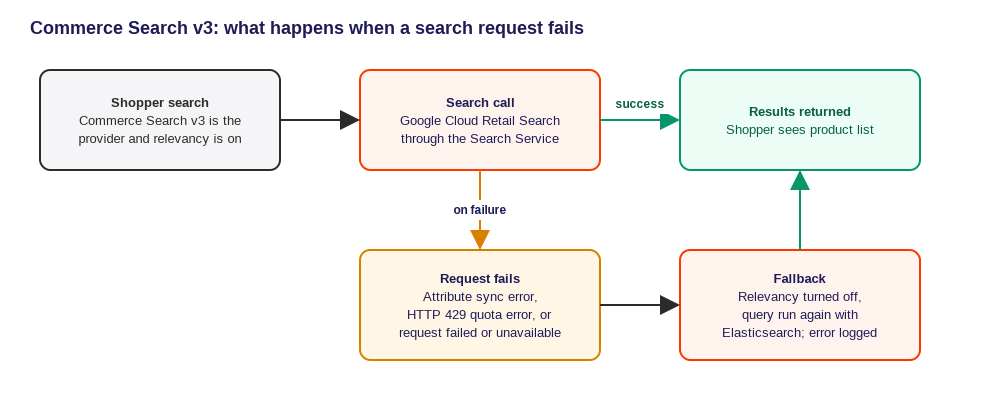
The first two cases already existed at the May LTS, so what this release adds is the broad "something is down" safety net. The trade-off to understand is in that second step: relevancy is switched off for the fallback search, so the results are no longer ranked by Search v3, so shoppers most likely get a working but less tuned product list. The error is logged with a message telling you to contact Optimizely Support if it keeps happening, which means you should watch for it in your logs, because a silent fallback can hide a real outage for days.
What Else Shipped
The rollup. This entry points to the May, June, July and August 2026 STS release notes as its feature and bug-fix list. If you are moving from the May LTS (5.2.2604.644), that includes the August STS breaking change: ICustomerOrderUtilities gained two overloads, GetOrderSubTotal and GetOrderSubtotalWithOrderDiscounts, that accept a list of product IDs to exclude. If you implement that interface yourself, add both. Our monthly posts for those four releases cover the rest.
Mobile refresh token lifetimes. Two new settings control how long a mobile client's session can be renewed: a sliding lifetime that is granted each time a refresh token is issued or rotated, and an absolute lifetime measured from initial sign-in, after which the user must sign in again. The sliding lifetime never extends a session past the absolute one, which is the correct design.
Application Insights SQL command text. An Admin Console setting, off by default, adds full SQL command text to database telemetry. Its own description warns that this can expose query structure and any values embedded directly in queries, so enable it only if your telemetry destination is trusted. It needs a site restart, and on .NET Framework it only works where the hosting environment provides the Application Insights instrumentation engine.
Hotfix highlights by area, as Optimizely lists them. Search v3 index rebuild failures and slow searches on large attribute sets; Opti ID sign-in conflicts when users share an email; SSO options still showing after being disabled; duplicate SSR headers behind Cloudflare; stale recommendation carousels; Saved Payments errors for Orbital and PayFlow Pro; and a Media Library upload failure for files around 30 MB. We did not trace each of these individually, so treat them as the release notes' claims. Optimizely also recommends that .NET Core customers install this build.
Two items we could not locate. The File Picker field for CMS widgets and the ODP import prompt for standard job definitions are listed in the notes, but we did not confirm either in the code.
What We Actually Found
The redirect allow-list is a security improvement that can break a working flow. Spire used to redirect to an absolute external URL if a safety check passed. Now it asks whether the target host is allowed. A new setting, Allowed External Redirect Hosts, takes exact hostnames, and exact means exact: allowing about.example.com does not allow example.com or any other subdomain. Hosts you already use as the target of a URL Redirect are permitted automatically. If an absolute redirect points anywhere else, the visitor is sent to the unhandled-error page instead.
That is the right default for stopping open-redirect abuse, but it means any external redirect you rely on, such as a payment return, an SSO hand-off or a marketing link, needs a deliberate test after upgrade. Make a list of every external host your storefront legitimately sends visitors to and either add it to the setting or confirm it is covered by a URL Redirect.
Three small payment and integration fixes carry more weight than their size suggests. The July hotfix train, which is inside this LTS, fixed three failure modes that were quiet and expensive. PayFlow Pro responses are now validated: the response must contain a numeric result field, and if it does not, the transaction is rejected with a clear error instead of being recorded as successful. A real-time Order Submit job now catches a connector exception, logs it as fatal, finishes the integration job and rethrows, so a throwing connector no longer leaves the job sitting in progress. And the Deactivate Inactive Users job now updates users in batches of 1,000 with a 300-second command timeout and a brief pause between batches. If any of those were symptoms you have lived with, this is the build that fixes them.
The notes say "a general security improvement" and leave it there. We found no single change in the diff that this phrase obviously refers to, so we cannot tell you what it covers. If your security team needs specifics for an LTS sign-off, ask Optimizely for the underlying list.
Under the Hood
Two flavors of token lifetime. Splitting the mobile refresh token into a sliding window and an absolute cap is a pattern worth copying in your own integrations: it lets active users stay signed in without letting a stolen token live forever.
The fallback keys on exception type, not on a timeout. That is more precise than a catch-all, but it also means a failure that surfaces as a different exception type would not trigger the fallback. We confirmed the three exception types above and did not test others.
A big rollup hides a small number of behavior changes. The frontend diff against the May LTS is 363 files, but only a few of those changes alter what a visitor or integration sees. The redirect handling is the clearest example.
What This Means for You
- Business stakeholders: this is the stable branch to standardize on if you want fewer, bigger upgrades. Ask your team for a list of external redirects before the cutover, because that is the most likely source of a post-upgrade surprise.
- Developers and architects: review the August STS
ICustomerOrderUtilitieschange if you implement that interface, configure Allowed External Redirect Hosts, and set an alert on the Search v3 fallback error messages so a quiet degradation does not go unnoticed. - Operations and platform teams: decide whether to set the mobile refresh token lifetimes explicitly, and leave the Application Insights SQL command text off unless you trust the telemetry destination.
- Teams on .NET Core: Optimizely specifically recommends this build for you.
Moving from the May LTS to this one and want a second set of eyes on redirects, search fallback behavior and the rollup before you cut over? That is exactly the kind of review Nishtech does for clients every month, so reach out and we'll walk through it with you.