Running Your Configured Commerce APIs on Linux: What It Actually Takes
Written by Lance Farquhar September 2026

Optimizely is moving its own cloud backend toward Linux. If you've wondered whether your Configured Commerce implementation could get there too — specifically the API tier, not the whole platform — we pulled apart the actual source and build artifacts of real implementations to find out. The short version: Optimizely already built more of the runway than you'd expect, and the real cost is narrower and more specific than "rewrite everything."
The 30-Second Version
- The API host layer is already there. Admin.Api, Integration.Api, and Storefront.Api already target .NET 8.
- The actual blocker is your own code. The Extensions project — where every custom widget, pipe, and handler lives — defaults to .NET Framework 4.8 only. Optimizely left a literal comment in the file telling you how to change that.
- Most ERP connectors are already portable. The ones we examined are built on plain HttpClient and REST, with no framework-specific dependencies at all.
- The one real variable is which version of your ERP connector you're on. Some legacy SOAP-based connectors were dropped from the .NET 8 build entirely — not ported, removed. Whether this project is easy or hard depends more on that than on anything else.
What Optimizely Already Shipped
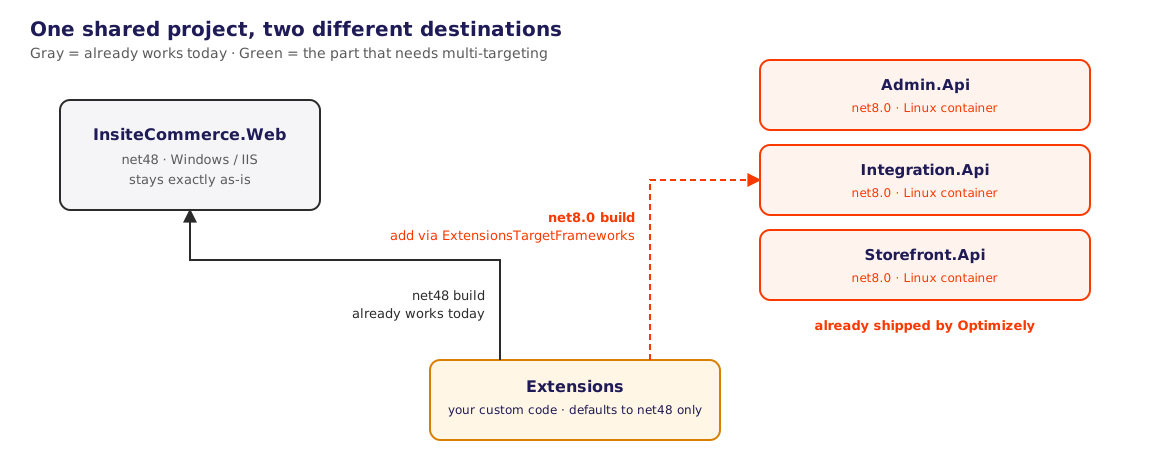
Before assuming this is a from-scratch porting project, it's worth knowing what's already sitting in a standard Configured Commerce SDK checkout. Admin.Api, Integration.Api, and Storefront.Api — the three services that make up the API tier, separate from the legacy InsiteCommerce.Web monolith — already target net8.0, and each one's Dockerfile builds from mcr.microsoft.com/dotnet/sdk:8.0 against a base image pulled from Optimizely's own container registry. All three share one underlying host:
// Program.cs — identical pattern across all three API projects
public class StorefrontApiProgram
{
    public static async Task Main(string[] args)
    {
        await AppHost.RunAsync(HostType.Storefront, o =>
        {
            o.LoadDotEnvFile = true;
        });
    }
}
Same AppHost.RunAsync call, different HostType value. This is already containerized and on .NET 8.
The Actual Blocker: Your Extensions Project
Every custom pipe, handler, and controller you've written lives in one project — Extensions.csproj — and is in the legacy .NET Framework 4.8 by default. An Optimizely engineer clearly anticipated this, see the comment describing exactly what to do for the various build states.
<PropertyGroup>
    <!-- change to net8.0, or net48;net8.0 if you want to multi target -->
    <TargetFrameworks>net48</TargetFrameworks>
    <TargetFrameworks Condition=" '$(ExtensionsTargetFrameworks)' != ''">$(ExtensionsTargetFrameworks)</TargetFrameworks>
</PropertyGroup>
That $(ExtensionsTargetFrameworks) property exists specifically so a build pipeline can override the default without editing the file — this is a supported path, not a workaround. Multi-target it to net48;net8.0, and MSBuild will build your custom code for both the legacy Windows monolith and the modern Linux-ready API hosts from the same source.
What Breaks When You Flip the Switch
Multi-targeting doesn't mean your code compiles clean on the first try. Across the real customization footprints we've reviewed, the same handful of legacy ASP.NET Framework dependencies show up, concentrated in a predictable, boundable set of files:
System.Web.Httpattribute-routed controllers — the most common item by far.[RoutePrefix],[Route],ApiController— these need porting to ASP.NET Core'sControllerBase/[Route]equivalents. Mechanical, if tedious, since the target hosts already run ASP.NET Core.- Classic
System.Web.Mvccontrollers — less common, but a real port rather than a rename when present. HttpContext.Current— the static, ambient-context pattern from classic ASP.NET. Needs to become an injectedIHttpContextAccessor. Usually confined to a handful of handler-chain files.HttpPostedFile— the ASP.NET Framework file-upload type; the Core equivalent isIFormFile.- Razor-rendered content generated outside MVC (
System.Web.WebPages) — this is the one that isn't mechanical. If you're rendering a.cshtmltemplate directly to produce a PDF or email body outside the normal MVC pipeline, that rendering model doesn't carry over to ASP.NET Core as a drop-in; it's a genuine rewrite of that one piece.
In every implementation we've looked at, this list stays short — a dozen or so files, not a sprawling rewrite — and the heaviest item is usually just one: the Razor-outside-MVC case, when it exists at all. Implementations with a smaller custom-code footprint clear this list in a handful of files; heavier, more integration-dense implementations have more controllers to port but the same short list of categories of change.
The ERP Connector Question
This is the part most people assume is the hard part, and it's worth being precise about instead of hand-waving it. Optimizely's own integration-connector library — the shared assembly behind every OOB ERP connector (Prophet21, IFS, SXe, Acumatica, and others) — has its actual source available, and it settles the question directly rather than leaving it to speculation.
The connector library's own project file is already dual-targeted, and its restored dependency graph confirms both target frameworks are live: .NETFramework,Version=v4.8 and net8.0, side by side. For most connectors, including the current REST-based versions of Prophet21 and IFS Aurena, the exact same code compiles for both — they're written against plain HttpClient and JSON/XML serialization, nothing Windows-specific at all.
But the project file also does this, explicitly, in its .NET 8 build configuration:
<ItemGroup Condition="'$(TargetFramework)' != 'net48'">
    <Compile Remove="Ifs\**\*" />
    <Compile Remove="SXe\V61\**\*" />
    <Compile Remove="SXe\V10\**\*" />
</ItemGroup>
That's the classic SOAP-based IFS connector — the older, pre-Aurena integration, built on System.Web.Services — along with the SXe V10 and V61 connectors. They aren't ported to .NET 8. They're removed from that build target entirely. If your implementation runs on one of these specific legacy connector versions, there is no OOB path to Linux for that integration — it needs a real rewrite (most realistically, a direct REST reimplementation, the same pattern already used elsewhere in these codebases for other connectors), not a recompile.
The practical implication: the difficulty of this whole project hinges on which version of your ERP connector you're on, more than on which ERP you're integrated with. IFS Aurena and classic SOAP IFS are two completely different stories for this specific question, even though they talk to the same ERP system.
What We Actually Found
We went in expecting ERP integration to be the dominant cost driver of a Linux migration, roughly proportional to how complex the integration is. That's not what the evidence shows. It's closer to binary: a REST-based connector on its current version is already net8.0-native with zero code changes required, full stop — while a legacy SOAP-based connector, even a comparatively simple one, was dropped from the .NET 8 build outright and needs a real rewrite. Integration complexity doesn't predict migration cost here. Connector version does.
That reframes the estimating question. Don't ask "how complicated is our ERP integration." Ask "which build of our ERP connector are we actually running, and does that specific connector still exist in Optimizely's .NET 8 build" — because the answer to that second question is either "yes, this is small project" or "no, budget a real rewrite of the connector," with not much middle ground.
A Practical Checklist
- Inventory your ERP connector version specifically — not just "we're on IFS" or "we're on Prophet21," but which variant (Aurena vs. classic SOAP, which SXe version, etc.). This single fact predicts most of your effort.
- Set
$(ExtensionsTargetFrameworks)tonet48;net8.0and do a clean build — this surfaces your actual list of files to fix, rather than guessing at it in advance. - Port
System.Web.Http/System.Web.Mvccontrollers to their ASP.NET Core equivalents. - Replace
HttpContext.Currentwith injectedIHttpContextAccessorwherever it appears. - Budget real time for any Razor-outside-MVC rendering (PDF generation, templated emails) — this is the one item on the list that isn't mechanical.
- If your ERP connector was dropped from the .NET 8 build, scope a direct REST/HTTP reimplementation rather than trying to port the removed SOAP code — Optimizely's own team chose not to, which is a signal worth taking seriously.
- Validate the whole integration end-to-end against a Linux-hosted container before treating any of this as done — restore succeeding and a clean compile are both necessary, neither is sufficient.
What This Means for You
- If you're scoping this as a project, the size of the job is set almost entirely by two things: how much custom code sits in
System.Web-family APIs (usually a short, countable list), and whether your ERP connector's specific version survived the jump to .NET 8. Everything else — the API hosts, the container images, the hosting model — is already done for you. - Performance — Optimizely's internal testing indicates Configured Commerce applications run up to 40% faster on .NET 8.0, with significant improvements in request throughput and memory efficiency.
- If you're not sure which ERP connector version you're on, that's the first thing to find out — it's a five-minute check that will tell you more about this project's real cost than any amount of estimating the rest of it.
Trying to figure out whether your own Configured Commerce implementation is closer to "recompile" or "rewrite" on the road to Linux? That's exactly the kind of source-level assessment Nishtech does for clients — reach out and we'll trace your actual connector version and customization footprint before you commit to a timeline.
-
 Optimizely, Ecommerce, Technology
Configured Commerce Upgrade Watch
Read More
Optimizely, Ecommerce, Technology
Configured Commerce Upgrade Watch
Read More
-
 Optimizely, Ecommerce, Technology
Classic to Spire: What Migrating Your Configured Commerce CMS Actually Takes
Read More
Optimizely, Ecommerce, Technology
Classic to Spire: What Migrating Your Configured Commerce CMS Actually Takes
Read More
-
 Digital Strategy, Optimizely, Technology, Ecommerce
Why Nishtech Is Betting on Optimizely, Shopify+ & Znode for 2026 and Beyond
Read More
Digital Strategy, Optimizely, Technology, Ecommerce
Why Nishtech Is Betting on Optimizely, Shopify+ & Znode for 2026 and Beyond
Read More
-
 Optimizely, Technology, Ecommerce
Transform Your B2B Search Experience: Why Optimizely’s Configured Commerce Search is the Upgrade Your Manufacturing Business Needs
Read More
Optimizely, Technology, Ecommerce
Transform Your B2B Search Experience: Why Optimizely’s Configured Commerce Search is the Upgrade Your Manufacturing Business Needs
Read More