Configured Commerce Upgrade Watch: June 2026
sts 5.2.2606.460+sts Covers June 2026
Written by Lance Farquhar July 24, 2026
Release 5.2.2606.460+sts, published July 22, 2026. Each month we read what Optimizely says shipped, then go verify it against the actual source — frontend and backend — so you get more than a changelog recap.
The 30-Second Version
- Headline feature: Buy Now, Pay Later lands at checkout — Klarna, Afterpay, Affirm, and Zip all route through a single, provider-agnostic payment element wired into Payment Service.
- Worth knowing: storefronts now log a user out automatically once "Site Timeout Minutes" expires, tracked across every open browser tab.
- One more to flag: a breaking signature change on
LogIfNeeded<T>in the search pipeline — low risk, and only relevant if you've extended that method yourself. - Our verdict: a frontend-heavy cycle for us to verify. Every item with a storefront footprint — BNPL, session timeout, password expiration, the maintenance-mode fix — checks out cleanly against source, right down to matching field and setting names verbatim.
The Headline: Buy Now, Pay Later at Checkout
Before this release, deferred-payment options like Klarna or Afterpay meant either building a custom integration per provider or doing without them. June's release adds all four major BNPL providers — Klarna, Afterpay, Affirm, and Zip — through a single new checkout section, with Payment Service doing the work of talking to whichever provider is actually configured.
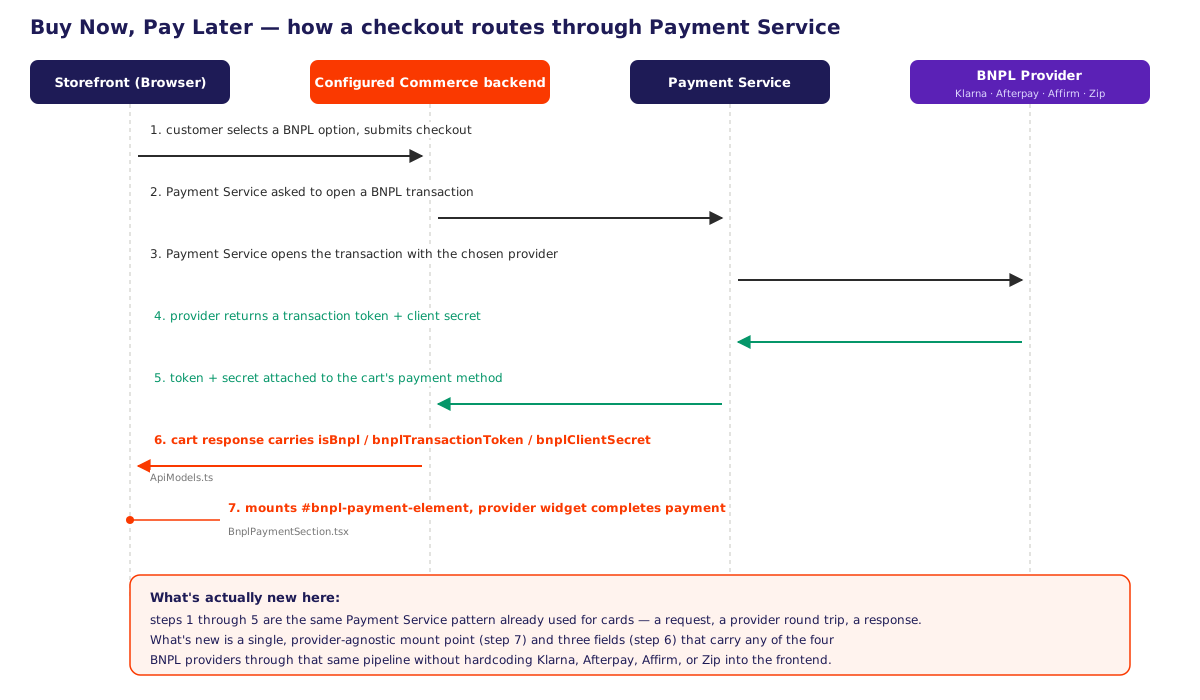
The new ApiModels.ts fields are the whole contract between the backend and the storefront for this feature:
// PaymentOptionsDto / PaymentMethodDto
isBnpl: boolean;
bnplTransactionToken: string;
bnplClientSecret: string;
Three fields — a flag, a token, and a secret — are all a cart needs to carry a BNPL transaction through checkout. Which providers are actually available lives in settings, not in the frontend code:
// SettingsService.ts, SpreedlyConfig
bnplEnabled?: boolean;
bnplApmTypes?: string[];   // "APM" = alternative payment method — Klarna/Afterpay/Affirm/Zip live here
That's the detail worth noticing: the new BnplPaymentSection.tsx component (154 lines) renders a generic #bnpl-payment-element mount point, not four separate Klarna/Afterpay/Affirm/Zip components. Adding a fifth BNPL provider later would mean adding a string to bnplApmTypes, not shipping new frontend code. CheckoutReviewAndSubmitPaymentDetails.tsx pulls bnplTransactionToken and bnplClientSecret off the cart's payment method and hands them to that mount point, and the PlaceOrder handlers in both the standard checkout reducer and the one-page-checkout equivalent picked up matching logic to carry a BNPL order through to completion.
What Else Shipped
One breaking change, low risk: RunProductSearchResult.LogIfNeeded<T> (in Insite.Search.Shared.DocumentTypes.Product.Query.Pipelines.Results) gained a required second parameter, ISearchResponse<T> searchResponse. This only affects you if you've extended that method in a custom search pipeline — everyone else is unaffected.
Confirmed and holding up cleanly, beyond the headline:
- Expired Session Handling — storefronts now log a user out automatically once "Site Timeout Minutes" elapses. More on the mechanism below.
- Password Expiration Enabled — a new toast warns users as their password approaches expiration, with separate messages for "expires tomorrow," "expires in N days," and "already expired."
- Maintenance mode fix — a session that was already active now notices maintenance mode flipping on, without waiting for some other trigger to force a re-render. Detail below.
Backend-only items we couldn't independently verify this cycle (our reference repo for the .NET backend hasn't picked up a commit for this release — more on that below): Website Level Search Provider Support, Granular Permissions for Websites, the Buy One Get One Free math change, the WIS Broker "Debugging Enabled" fix, the conditional Admin Console search pages, and the removal of the legacy FedEx SOAP integration. These are worth testing directly against a running instance rather than taking purely on the strength of the notes.
Bug fixes with a plausible, if not airtight, match in the frontend diff:
- Email sharing failures on .NET Core sites —
ShareEntityButton.tsxfixes a stuck "sending" state on API failure. - Admin.Api partner execution issues post-Vite changes — a new
ServerFetchSetup.tsforces the server relay onto nativefetchbefore any other server-side code runs. - CMS launch using a templated URL instead of the site vanity URL —
PagesActionCreators.tsadds a guard before marking a page as loaded. - Absolute URL redirect errors —
ProductListPage.tsxadds a server-side guard around alocalStorageread on the redirect path.
The remaining bug fixes this cycle are backend-only and, like the highlights above, are worth confirming directly if they touch a workflow you rely on.
What We Actually Found: A Password Check Nobody Announced
Every post in this series, we go looking for something the release notes don't mention. This month it's a real security change that shipped identically in two different places.
Edit your own email address — in the storefront My Account page, or in the admin console's User Setup page — and save is now intercepted. A new modal demands your current password before the change goes through:
const isSelf = editingUser.id === currentUser?.id;
...
if (isSelf && editingUser.email !== initialUserEmail) {
    setPasswordError("");
    setShowPasswordModal(true);
    return;
}
What makes this worth calling out is how it's built: one new component, ConfirmEmailChangeModal.tsx (98 lines), reused by both AccountSettingsHeader.tsx on the storefront and UserSetupHeader.tsx in the admin console, rather than two separate password-check flows built for two separate screens. SaveUser.ts's handler gained a single new optional parameter, currentPassword, threaded straight into the existing account-save payload — no new endpoint, no parallel save path. The release notes never name this mechanism; the closest thing is a generic "Enhanced security" bullet. If your team owns a custom account or admin profile page that edits email addresses, this is the change to go find before a support ticket finds you first.
Under the Hood
The session-timeout watcher is a single, self-contained component. SessionTimeoutWatcher.tsx (125 lines) tracks activity across every open tab via localStorage and reads the exact setting the release notes name:
const siteTimeoutMinutes = useSelector(
    (state: ApplicationState) => getSettingsCollection(state).accountSettings.siteTimeoutMinutes,
);
When the timer runs out, it calls deleteSession() and redirects to sign-in — a direct, traceable match for "automatic storefront logout," with no other moving parts.
The maintenance-mode fix is a one-line dependency-array change, in exactly the right place. Maintenance.tsx's effect used to run once on mount and never again:
-    }, []);
+    }, [maintenanceModeEnabled]);
An already-open browser tab wouldn't notice maintenance mode turning on until something else happened to force React to re-run the effect. Keying it to the flag itself is the fix, and it's small enough to read in full.
The breaking change's "before" state checks out, even without a matching "after." We don't have a partner-repo commit for this release to diff directly, but we did confirm the pre-change state: at the partner repo's last synced commit (5.2.2604.616+sts), RunProductSearchResult.cs still carries the old two-argument signature —
LogIfNeeded<T>(ISearchRequest<T> searchDescriptor, string name)— with no ISearchResponse<T> searchResponse parameter. That's consistent with the release note describing a change that hadn't happened yet as of that commit; it's not proof of what replaced it, just confirmation there's no contradiction to flag.
What This Means for You
- If you use Payment Service for card payments already, BNPL is opt-in per provider through
bnplEnabledandbnplApmTypes— nothing new to build, just settings to turn on. - If you've extended
RunProductSearchResult.LogIfNeeded<T>in a custom search pipeline, add the newsearchResponseparameter before you upgrade — this is the one change here that can break custom code outright. - If you have a custom "change email" flow on the storefront or in the admin console, test it against the new password-confirmation step — it's a real UX change that isn't mentioned anywhere in the notes.
- If your storefront relies on a specific idle-timeout behavior, double-check your "Site Timeout Minutes" setting — logout is now automatic and enforced across tabs, where it may not have been enforced consistently before.
- If you rely on Website Level Search Provider Support, Granular Permissions, BOGO, or the other backend-only items this month, budget time to test them directly against a running instance — our backend reference repo hasn't caught up to this release yet, so we can't independently confirm those beyond what Optimizely describes.
Upgrading a Configured Commerce storefront and want a second set of eyes on what actually changed under a release before you take it? That's exactly the kind of review Nishtech does for clients every month — reach out and we'll walk through it with you.