Configured Commerce Upgrade Watch: August 2026
sts 5.2.2608.613+sts Covers August 2026
Written by Lance Farquhar September 7, 2026
Release 5.2.2608.613+sts, published September 3, 2026. Each month we read what Optimizely says shipped, then go verify it against the actual source — frontend and backend — so you get more than a changelog recap.
The 30-Second Version
- Headline feature: WebMCP storefront tools are real and in the frontend repo now — seven purpose-built tool handlers (cart context, cart lines, product search, product detail) that an AI shopping agent calls directly, wrapped in an error boundary and gated behind a permissions-policy probe so an unsupported embed never crashes the page.
- One breaking change worth two minutes:
ICustomerOrderUtilitiespicked up overloads ofGetOrderSubTotalandGetOrderSubtotalWithOrderDiscountsthat take a list of product IDs to exclude from the calculation — and we can now show you exactly what calls what. - Worth knowing: promotions can exclude specific products from a discount, VMI labels can print bin location and min/max quantity, and the Admin, Storefront, and Integration APIs all got real generated OpenAPI documents with a Swagger UI.
- Our verdict: a genuinely good release, and an unusually interesting one under the hood — the nightly maintenance job got a quiet rewrite that's worth reading even if you never touch it directly.
The Headline: WebMCP Storefront Tools
"Make your Spire storefront agent-ready" is Optimizely's pitch for this one, and the implementation backs it up. Rather than pointing an AI shopping agent at Configured Commerce's existing REST API and hoping it infers the right shape, the frontend now ships a dedicated WebMcpTools component that registers seven named tools an agent can call directly: get context, get cart, search products, get product, add to cart, update cart line, remove cart line.
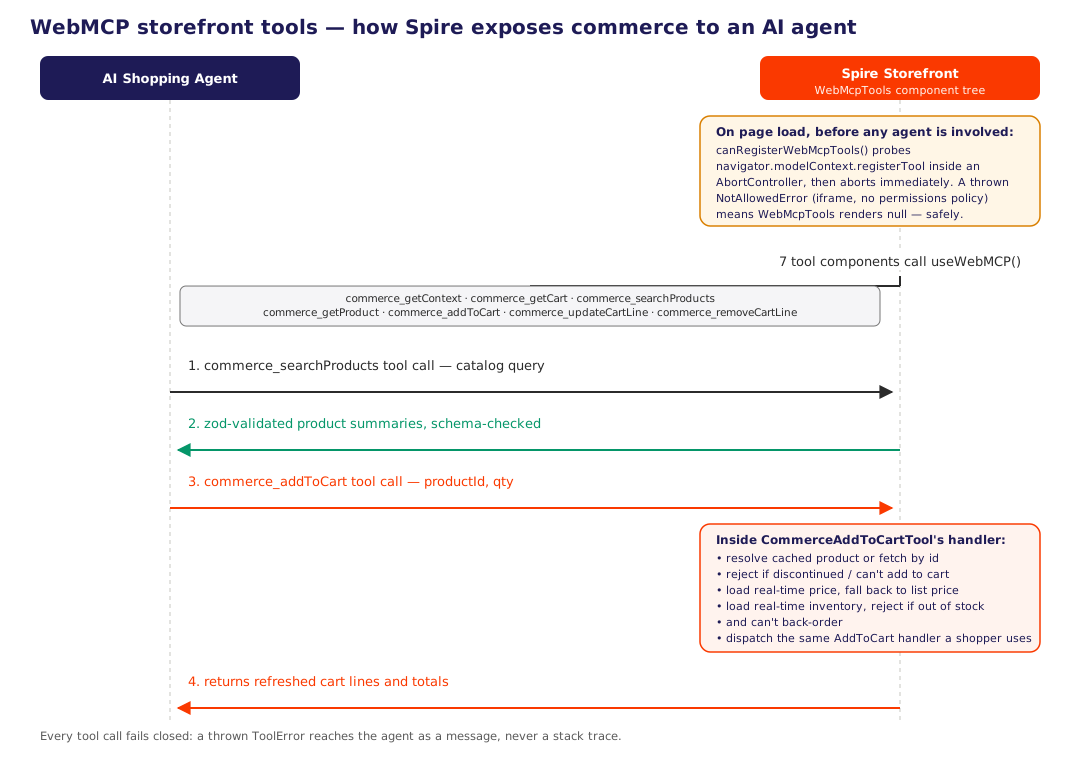
The registration layer is careful about where it's allowed to run. WebMCP tool registration is gated by permissions policy, and inside an iframe that doesn't grant it, calling registerTool throws synchronously — which would otherwise tear down the whole React root. The fix is a one-shot probe that registers and immediately aborts a throwaway tool just to see if it's allowed:
// Store/WebMcpTools/Helpers/canRegisterWebMcpTools.ts
export default function canRegisterWebMcpTools() {
    const modelContext = (window.document as any)?.modelContext ?? (window.navigator as any)?.modelContext;
    if (!modelContext || typeof modelContext.registerTool !== "function") {
        return false;
    }

    const controller = new AbortController();
    try {
        modelContext.registerTool.call(
            modelContext,
            {
                name: "commerce_webMcpAvailabilityProbe",
                description: "Internal availability probe.",
                execute: async () => ({ content: [] }),
            },
            { signal: controller.signal },
        );
        return true;
    } catch {
        return false;
    } finally {
        controller.abort();
    }
}
Only when that probe succeeds does WebMcpTools render its seven child components, and even then each one is wrapped in a dedicated error boundary that swallows a registration failure and logs a warning rather than taking down the storefront. Agent-facing surfaces are exactly where you want this kind of defensive layering — an environment that half-supports a browser API is far more common than one that fully doesn't.
What Else Shipped
One breaking change, confirmed against the actual interface: Insite.Core.Plugins.EntityUtilities.ICustomerOrderUtilities gained two overloads this release — GetOrderSubTotal(CustomerOrder, ICollection<Guid>) and GetOrderSubtotalWithOrderDiscounts(CustomerOrder, ICollection<Guid>). If you've implemented this interface yourself, you need both; the default implementation's exact mechanics are below.
Promotions and discount results can now be scoped with an Exclude Products list, letting a promotion leave specific SKUs out of a discount instead of requiring the inverse — an inclusion list of everything else.
VMI label printing picked up Bin Location, Minimum Quantity, and Maximum Quantity as selectable fields, with the label layout recalculating how many lines each field gets based on what's actually selected.
API tooling got real documentation: the .NET Core Admin, Storefront, and Integration APIs each now generate their own OpenAPI document and serve a Swagger UI, scoped correctly so OData-backed admin endpoints don't pollute the storefront document (and vice versa).
The storefront error modal now shows a timestamp and, when available, the Cloudflare Ray ID and Datadog Trace ID for the failed request, with a one-click copy button — a direct line from "a customer reports an error" to "support can find the exact request in the logs," covered in more detail below.
Payment settings picked up three changes: Spreedly's Environment Key and Environment Name moved from per-website to global scope; SettingsFieldAttribute.IsEncrypted is now formally marked [Obsolete] in favor of Vault-backed secret storage (the new UCP settings group uses the Vault path directly, as an example of the pattern Optimizely wants going forward); and a new UCP settings group was added for Unified Commerce Platform / Google Pay configuration.
A new integration job, UpdateDataWithDAMUrls, finds and rewrites database records that still point at legacy UserFiles URLs so they use the Digital Asset Management equivalent instead — registered automatically alongside the rest of the standard jobs on upgrade.
Everything else — a long list of enhancements and bug fixes, several already delivered as hotfixes earlier in the cycle — is lower-risk and not worth re-litigating here; if a specific item matters to your storefront, it's worth a direct check against a running instance rather than trusting any summary, including ours.
What We Actually Found: A Nightly Job Rewritten From the Ground Up
Every post in this series, we go looking for something the release notes undersell. This month it's not a new feature at all — it's a maintenance job almost every storefront already runs, rebuilt in a way nobody would notice unless they went looking at the diff.
JobPostprocessorNightlyMaintenance — the job that clears out abandoned carts, old email messages, stale translation records, and expired integration logs — used to do this work through Entity Framework: load matching rows into a repository, batch them, delete a hundred at a time. Every one of those purge routines has been rewritten this release to bypass EF entirely and run hand-written, batched DELETE TOP (n) and UPDATE TOP (n) statements directly against SQL Server, with WITH (READPAST) on every query so a long-running purge never blocks or gets blocked by normal storefront traffic, and a WAITFOR DELAY between batches so it doesn't hammer the server in a tight loop:
// JobPostprocessorNightlyMaintenance.cs
private void ExecuteBatchedDelete(string deleteStatement, Action<SqlCommand> configureParameters = null)
{
    this.UnitOfWork.DataProvider.SqlExecuteNonQuery(cmd =>
    {
        cmd.CommandText = $"""
        SET NOCOUNT ON
        DECLARE @Continue INT = 1
        WHILE (@Continue > 0)
        BEGIN
            {deleteStatement}
            SET @Continue = @@ROWCOUNT
            WAITFOR DELAY '00:00:00.100'
        END
        """;
        cmd.CommandTimeout = TimeoutSeconds;
        configureParameters?.Invoke(cmd);
    });
}
Nine separate purge routines — abandoned cart cleanup, email message retention, translation dictionary cleanup, integration job/log retention, RFQ quote expiration, punchout history, temporary page cleanup, and temporary rule manager and promotion cleanup — were all converted to call this same helper (or its scalar-returning twin, for the routines that report a row count) with their own DELETE TOP (n) or UPDATE TOP (n) statement. That's a real, well-scoped refactor: one helper, nine call sites, no copy-pasted SQL. It also quietly fixes a bug — the old EF-based abandoned-cart purge only ever deleted carts matching the AbandonedCart status filter, while the new SQL version also catches AlternateCart-typed rows that EF's BatchDelete extension wasn't reliably reaching on high-volume databases, which lines up with Optimizely's own description of this as a memory and reliability fix for high-transaction sites.
If you've ever had Nightly Maintenance time out or chew through memory on a large database, this is the actual fix, not just a release-note line.
Under the Hood
The ICustomerOrderUtilities breaking change, in the real implementation:
// CustomerOrderUtilities.cs
public virtual decimal GetOrderSubTotal(CustomerOrder customerOrder)
{
    return this.GetOrderSubTotal(customerOrder, []);
}

public virtual decimal GetOrderSubTotal(CustomerOrder customerOrder, ICollection<Guid> excludedProductIds)
{
    var orderSubTotal = this.GetOrderLinesForSubTotal(customerOrder)
        .Where(o => !excludedProductIds.Contains(o.ProductId))
        .Sum(o => orderLineUtilities.Value.GetTotalNetPrice(o));
    return NumberHelper.RoundCurrency(orderSubTotal);
}
The old single-argument method still exists and just calls the new one with an empty exclusion list, so existing callers don't change behavior. GetOrderSubtotalWithOrderDiscounts follows the identical pattern, threading the same exclusion list through to the subtotal call underneath it. This is the plumbing behind the new promotion-exclusion feature above: PromotionResultServiceBase gained an IsProductExcluded check that reads a PromotionResult.Products collection, and the order-total math needed a way to leave those specific products out of a subtotal without excluding them from the order entirely.
The error-ID correlation pipeline, traced end to end. A new CorrelationContext middleware captures the inbound CF-Ray header and pushes it into the Serilog log context for the life of the request, while a Datadog trace-ID enricher adds the current trace ID to every log line:
// CorrelationContext.cs
internal static IApplicationBuilder UseCorrelationContext(this IApplicationBuilder app)
{
    app.Use(async (context, next) =>
    {
        var cfRay = context.Request.Headers["CF-Ray"].ToString();
        context.Response.OnStarting(() =>
        {
            var traceId = CorrelationIds.CurrentDatadogTraceId;
            if (!string.IsNullOrEmpty(traceId))
            {
                context.Response.Headers["X-Datadog-Trace-Id"] = traceId;
            }
            if (!string.IsNullOrEmpty(cfRay))
            {
                context.Response.Headers["CF-Ray"] = cfRay;
            }
            return Task.CompletedTask;
        });
        // ...pushes cfRay into the Serilog LogContext for this request
        await next(context);
    });
    return app;
}
The unhandled-exception handler augments the JSON error body with the same two IDs, the frontend's ApiService reads them off either the response headers or the error payload, and a new ErrorModalTimestamp component renders them in the error modal with a monospace, copy-to-clipboard block. It's a small feature end to end, but it's implemented completely — backend middleware, exception handling, API client, and UI component all carrying the same two IDs — which is why it's genuinely useful rather than a cosmetic add.
The VMI label line-clamp math is a nice bit of layout logic worth noting: GetLineClamps figures out, per label, how many lines the wrapping fields (customer name, manufacturer item, ERP number) and the description get, based on which single-line fields (bin number, min/max quantity) are selected and how much vertical space the barcode format leaves:
// VmiBinPdfService.cs
var totalLines =
    layout == "Avery22806" ? 8
    : barcodeFormat == "QRCode" ? 10
    : barcodeFormat == "Code39" ? 7
    : 8;
var linesToShare = Math.Max(sharingCount, totalLines - singleLineCount - reservedForDescription);
var share = linesToShare / sharingCount;
Rather than a fixed line budget per field, the label adapts to whatever combination of fields a customer actually turns on.
What This Means for You
- If you've implemented
ICustomerOrderUtilitiesyourself, add both new overloads — the default implementation shown above is a safe reference for what they should do. - If you're evaluating AI shopping-agent support, the WebMCP tools are real code now, not a roadmap item — pull the frontend repo and look at the seven tool handlers under
WebMcpToolsbefore you scope an integration. - If Nightly Maintenance has ever timed out or chewed through memory on your database, this release is the actual fix — no configuration change needed, it's a drop-in rewrite of the same job.
- If you run promotions, the Exclude Products field is additive and opt-in — safe to pick up whenever a margin-protection case comes up.
- If you build or maintain integrations against Configured Commerce, the new Swagger UI on the Admin, Storefront, or Integration API is live now and costs nothing to start using.
- If you use Spreedly, double-check your Environment Key and Environment Name settings after upgrade now that they're global instead of per-website.
- If a customer reports a storefront error, ask them to copy the new timestamp/Ray ID/Trace ID block from the error modal — it'll save a round trip to the logs.
Upgrading a Configured Commerce storefront and want a second set of eyes on what actually changed under a release before you take it? That's exactly the kind of review Nishtech does for clients every month — reach out and we'll walk through it with you.