
What is this SitecoreAI Legacy Tag?
written by Steve Sobenko
|February 2026
You log into your SitecoreAI project.
You see a little tag that says “Legacy” in Sitecore Deploy
Your stomach drops.
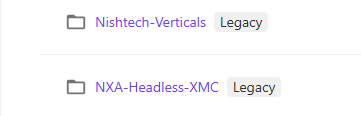
Your SitecoreAI site is brand new! How is it legacy already!
Did we miss something?
Is support ending?
Is this like when your phone says “unsupported OS” and everything breaks next week?
Take a breath.
Nothing is broken. Nothing is expiring. And no, your site isn’t about to fall over.
Let’s unpack what this actually means.
What “Legacy” Actually Refers To
The label is tied to a deployment model change in SitecoreAI, not to your content, not to your infrastructure health, and not to your support status.
Specifically, it refers to Coupled Deployments versus the newly released Decoupled Deployments, which are now generally available and enabled by default for all new projects as of January 29, 2026.
If your project says “Legacy,” it simply means:
Your project was originally created using the older coupled deployment model.
That’s it.
Your site still runs.
Your deployments still work.
You still receive updates.
There is no emergency.
What Changed: Decoupled Deployments (Now GA)
Decoupled Deployments separate the CMS application from individual editing hosts.
In practical terms, that gives you:
- Targeted deployments without full CMS rebuilds
- Independent repositories per editing host
- Reduced compute and search index load
- Cleaner multi-site management
- Faster deployment cycles
- Isolated logs and clearer operational boundaries
For organizations running multiple applications against a single CMS, this is a major architectural improvement. It improves scalability and developer ergonomics without increasing operational complexity.
And importantly:
All new projects now default to this model.
That does not mean older ones are broken. It simply means the platform has evolved.
What It Means for Existing Projects
If your project was created under the older coupled deployment model:
- It continues to function normally
- Redeployments remain coupled
- No configuration changes are required
- Nothing stops working
The “Legacy” label is informational, not punitive.
You can continue running as-is.
However, Sitecore recommends migrating to the new decoupled architecture using the Convert option in project settings. That conversion process is straightforward and designed to transition your project into the newer architecture cleanly.
This is an architectural modernization, not a crisis response.
Why You Shouldn’t Be Alarmed
In enterprise platform language, “legacy” often triggers anxiety because historically it has meant:
- Out of support
- Security risk
- Upgrade immediately
- Large migration effort
That is not what this is.
This is closer to:
“You’re using version 1 of a deployment strategy. Version 2 is better. You can switch when ready.”
There is no sudden loss of capability. There is no degradation. There is no ticking clock attached to that label.
It is a signal of evolution, not obsolescence.
Is the Update Complex?
In most cases, no.
The conversion process is handled at the project configuration level inside SitecoreAI. It does not require rebuilding your content model, redesigning your front end, or rearchitecting your data.
It is a deployment architecture shift, not a platform migration.
From an engineering perspective, this is a controlled improvement — not a disruptive replatforming.
When Should You Convert?
You should prioritize conversion if:
- You manage multiple sites under one CMS
- You want independent repositories per editing host
- You need more granular deployment control
- You want to align with future platform enhancements
If you are running a smaller single-site implementation with stable release cycles, there is no operational urgency.
The Bottom Line
If your SitecoreAI site says “Legacy,” it means:
- You are on the previous deployment model
- Your system is stable
- Nothing is expiring
- You can convert when ready
The platform matured. Your project predates that maturity.
That’s not a red flag. That’s normal software evolution.
Treat it as a routine modernization opportunity — not a fire alarm.