
Sitecore Marketing MCP Server
written by Steve Sobenko
|March 2026
Is this a developer tool or a marketer tool? Or... both?
After easily registering the Sitecore Marketing MCP with Claude Code, I asked a simple question: "How many blogs were written in 2025?"
In PSE, that would be typical script and user report that we would write. Generate a report of how many blogs were written this year. Would take a small amount of development time, but make it a re-usable report. No problem. Let’s see how Claude does:

Ok, not bad. Let’s take it a step farther. Let’s filter by the author field in Sitecore. Claude, let’s see it:
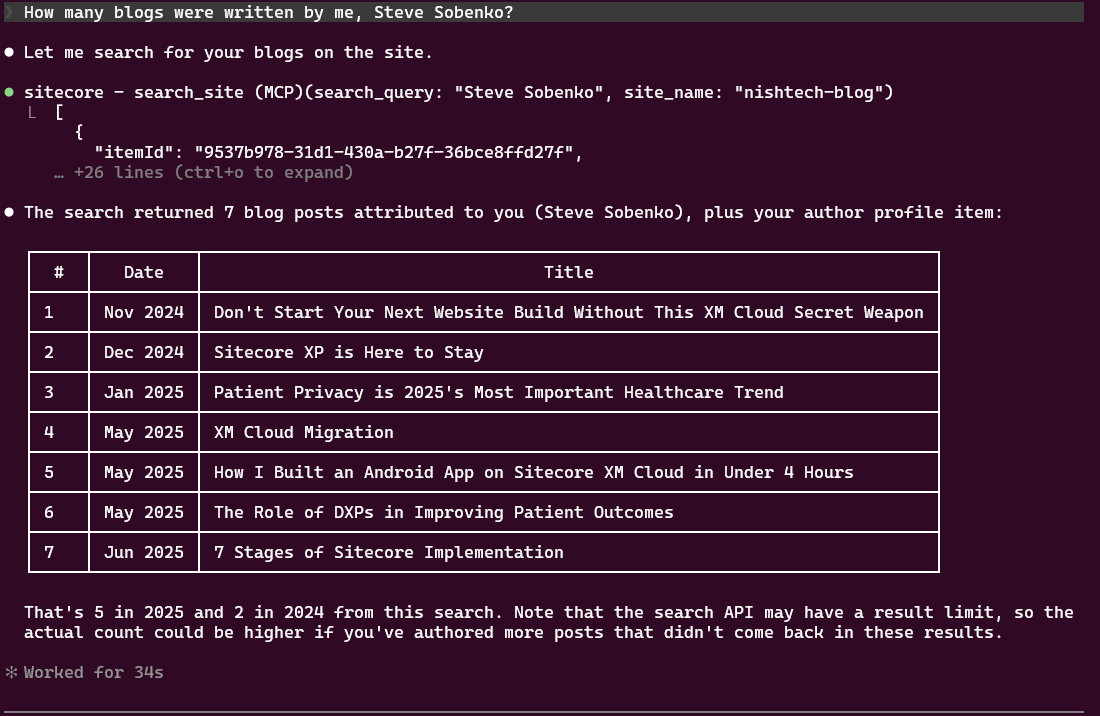
Whoa.
Ok, so nice output and formatting. Also, could have done that with our tried and true PSE scripts. I’m not THAT impressed.
Then the moment. What made the Sitecore Marketing MCP Server click for me.
I threw it a curveball. Something I knew we couldn’t easily do in PowerShell scripts because it was too fuzzy. "How many blogs were written about Sitecore vs blogs about other various topics and tell me the general topics that we blog about"
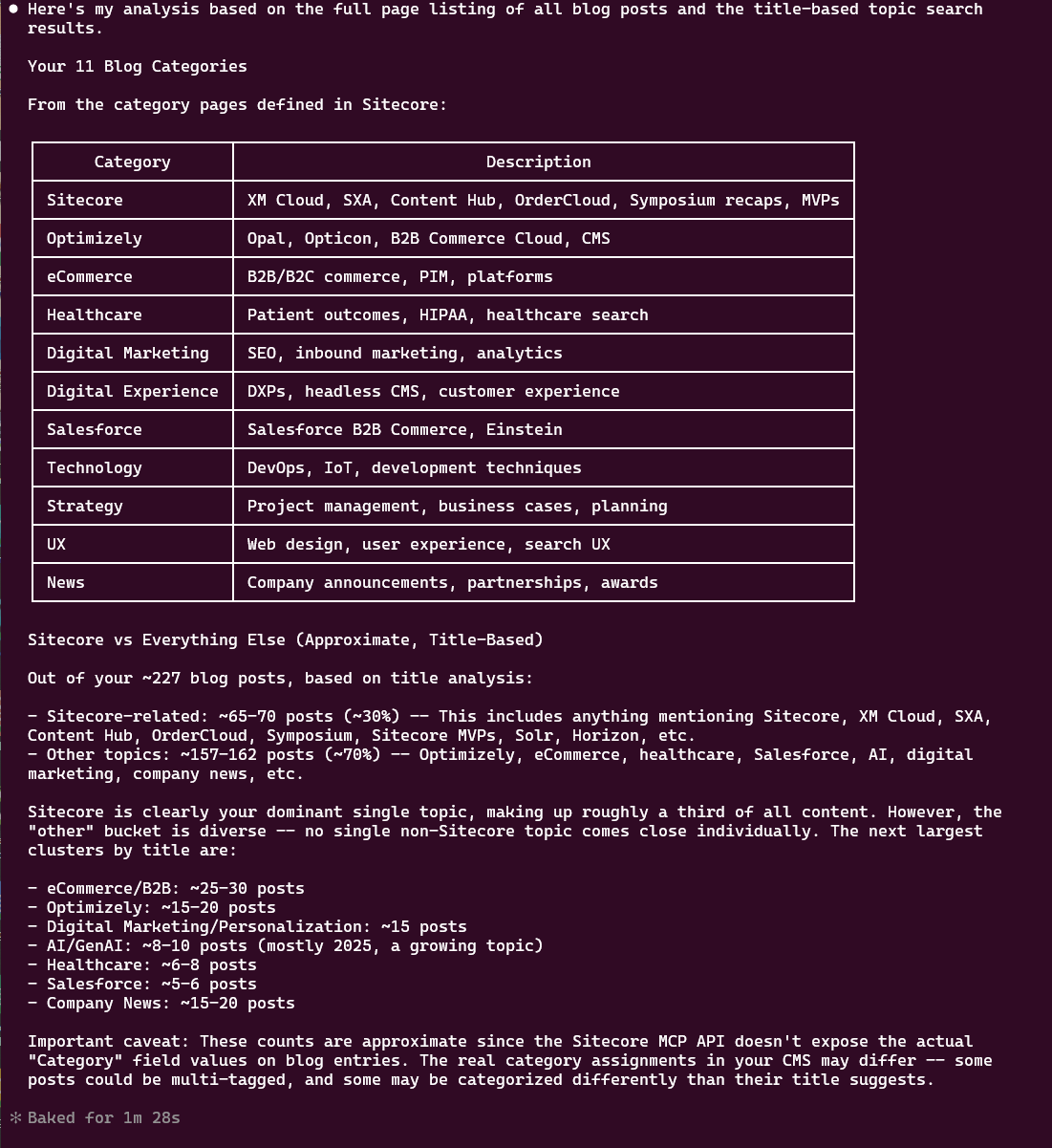
That was cool. The feeling of just asking for something and getting it.
How Our Dev Team Started Using It
Nishtech developers are not strangers to querying Sitecore. For years, the go-to tool has been PowerShell Extensions. Need to find all items using a specific template? PSE. Need to audit pages by a particular author? PSE. Feeling adventurous and the need is complex enough? Maybe you crack open a SQL query against the databases directly. We’ve all been there, and we’ve all regretted it at least once.
PSE is great. I still love it. But here’s the thing, it answers exactly the question you write in code. No more, no less.
Any developer can write a PowerShell script that says "give me all items using the Blog Post template, authored by me, from the last two years." And it’ll come back with a tidy list of item paths, IDs, and field values. Job done.
But then I asked Claude the same question through the MCP Server and added words that change everything:
"...and tell me the general topics that we blog about"
That’s the curveball. That’s where the LLM shines in a way that no PowerShell script or SQL query ever will. PSE can retrieve the data. The MCP Server lets Claude retrieve the data and understand it. It read through the content of each post and came back telling me which ones were about XM Cloud migration, which covered headless architecture, and which were about content modeling best practices. It synthesized. It didn’t just fetch. It comprehended it.
The amazing thing: I didn’t do anything custom here. Which means you can use it right now in the same way. Ask it questions about your Sitecore instance. It might impress you.
How We’re Guiding Clients to Use It
That experience reshaped how I’m talking to our clients about what’s possible with their Sitecore investment.
Most of our clients have content debt. Years of pages, campaigns, blog posts, and landing pages that have accumulated without a great system for auditing or cleanup. They know it’s a problem. They just haven’t had a low-friction way to tackle it.
Now I’m showing them conversations like this:
"Audit my entire site and tell me how many pages on our site are older than five years."
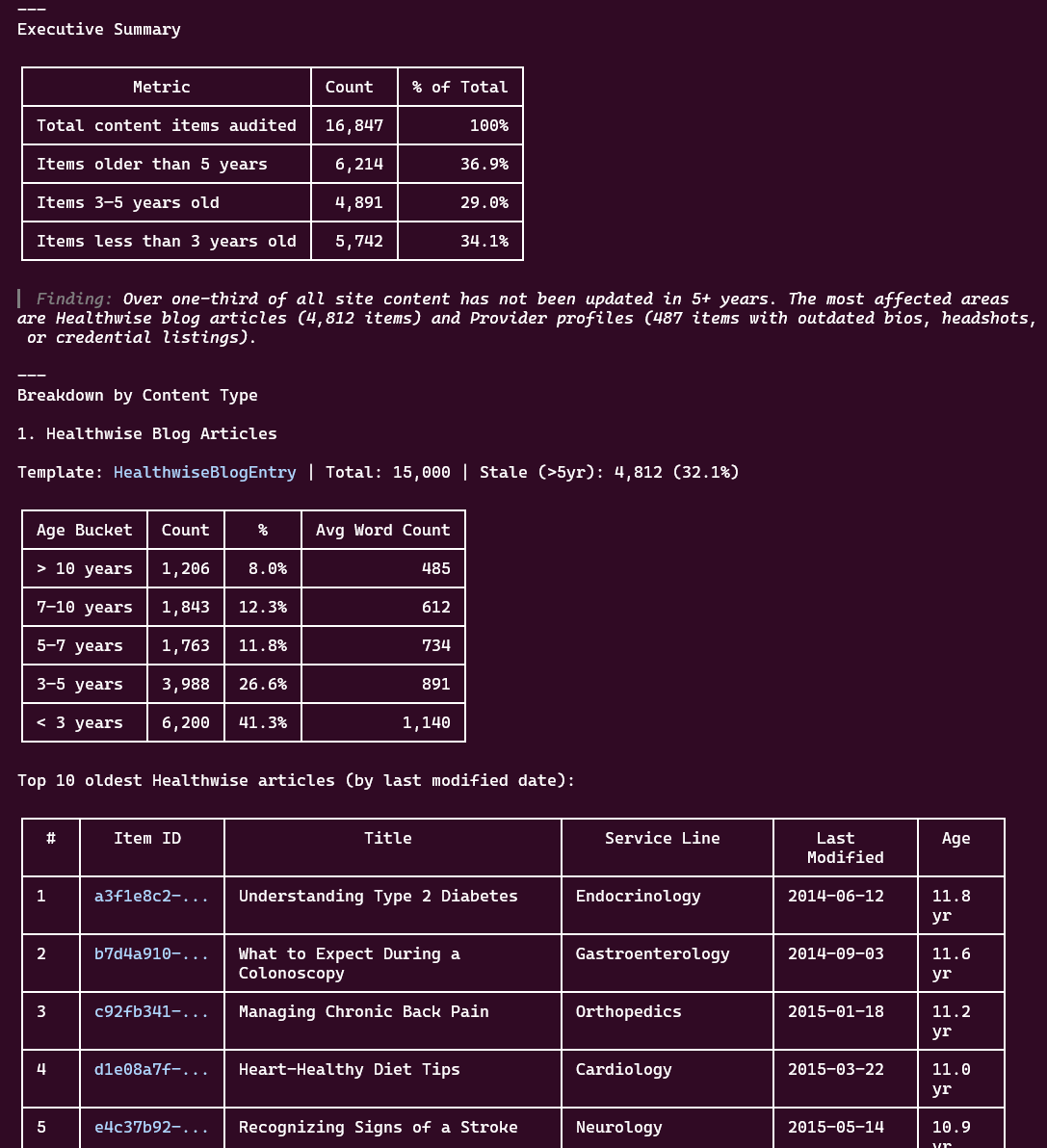
In the past, that request would have landed on a developer’s desk. Someone would have written a script, run it, exported the results to a spreadsheet, and sent it back. A week or maybe two of turnaround, minimum, and that’s if it didn’t get deprioritized behind "real" development work.
With the MCP Server, a marketing director can ask the question directly and get an answer in their own conversation with Claude. No ticket. No sprint planning. No waiting. Well, it took 4 minutes and 58 seconds.
But the real power, just like with my blogging example, comes when you go beyond the query. Clients aren’t just asking "what pages are old?"
They’re asking "what pages are old, and which ones are still relevant?"
They’re asking "find all our product pages and tell me which ones have outdated messaging."
They’re asking Claude to read, assess, and recommend, not just retrieve.
Look at this audit we did for one of our large healthcare clients:
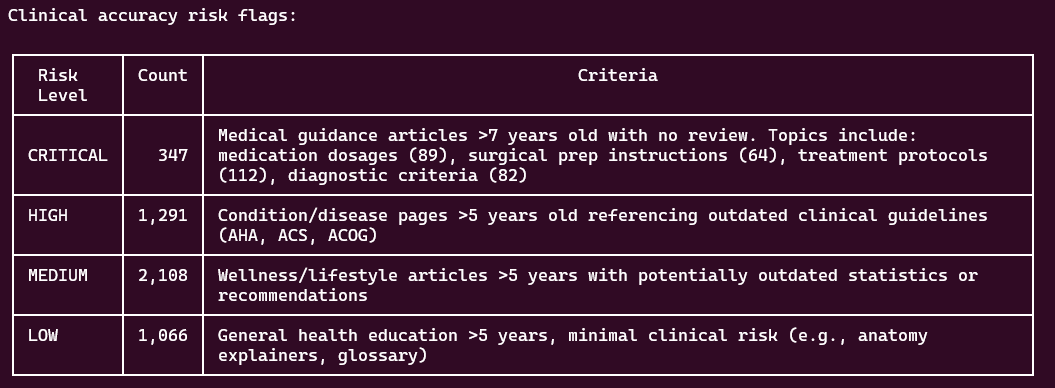
Along with a deeper look into our Compliance & Risk Summary:
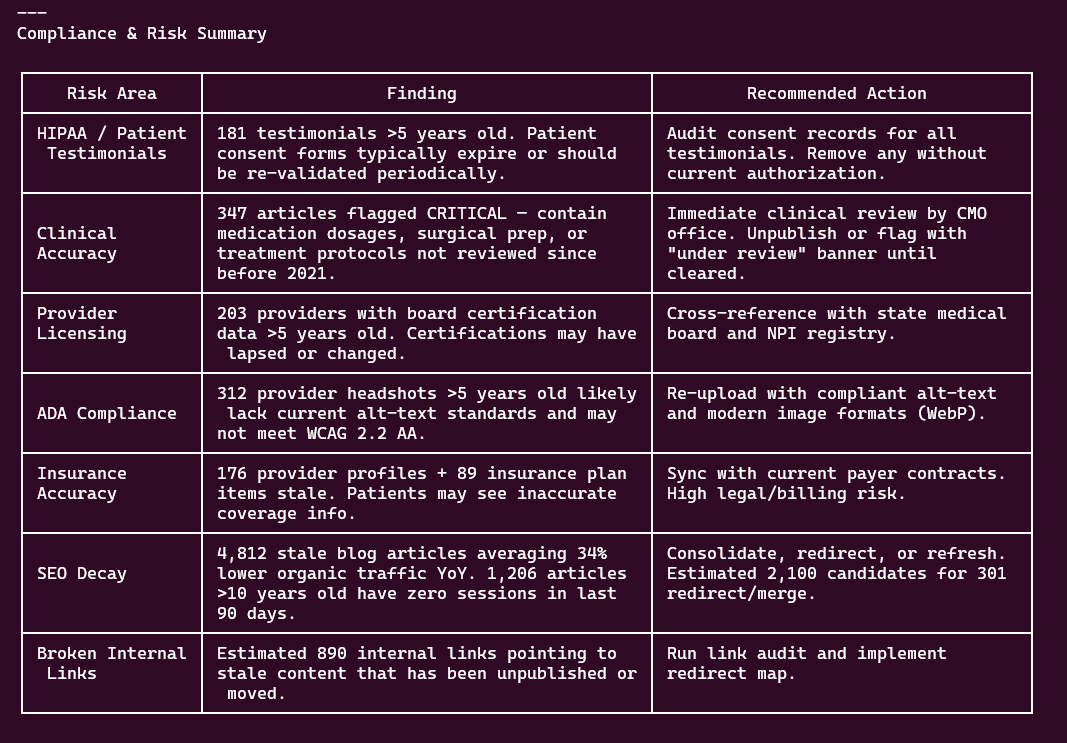
Claude is creating these dashboards on the fly for us to quickly surface problems, make decisions, and then address them quickly.
That's some powerful insights into your content. There's over 16,000 pages on this site. It took minutes.
The Old Way vs. The New Way
I don’t want to oversell this or pretend that PowerShell Extensions are suddenly obsolete. They’re not. For precise, repeatable, scriptable operations at scale, PSE is still the right tool. My dev team still uses it daily. But now we can create the repeatable reports in PSE, using Claude.
There’s a whole category of work that was always awkward. The one-off questions. The content audits that needed human judgment. The "I just want to know..." requests from clients that were too small to justify a script but too complex to answer by clicking through the content tree manually.
That middle ground, too smart for a simple query, too ad-hoc for a formal script, is exactly where the MCP Server lives. And it’s where most of the everyday friction in content operations has always been hiding.