
Upgrading from Optimizely CMS 12 to CMS 13
written by Lance Farquhar
|May 2026
Another major upgrade from Optimizely, this time with the CMS that they are highly known for. There are some architectural changes that are significant enough with patterns that your team relied on in CMS 12 (custom section renderers, Lucene-based search, the old Website model, deeply nested content structures) that either don't exist anymore or work fundamentally differently. I attended the Optimizely World CMS 13 Tour to learn about what are the real expectations that we can have and challenges that we will face.
For Optimizely, it was a full rethink of how content is structured, delivered, and consumed which resulted in some UI changes, removal of some old functionality, the addition of GraphQL, and some AI sprinkled in to keep the PE firm happy. The CMS is moving towards headless-first and the support of another channel aka content for AI. For you, it means it's no longer only about delivering web pages to just human visitors. CMS 13 is designed to serve content even to AI agents and agentic workflows that increasingly interact with content systems programmatically.
If you've built your CMS 12 implementation around tightly coupled front-end rendering, you can now reconsider that approach with some of the new fancy tools like GraphQL. Don’t worry, CMS 13 still supports MVC but now it can support both traditional MVC rendering and fully headless delivery. This is primarily due to the addition of GraphQL and supporting infrastructure, which the Optimizely marketing team calls “Content Graph.” Within CMS 13, you get a new editing experience called the “Visual Builder.” There are no take backs on this one, because the old editing experience has been dropped due to the JavaScript library supporting that functionality is way past its prime. The Visual Builder comes from the SaaS product and you can tell it was built with SaaS in mind because when using it with MVC, the whole page refreshes on content changes, in headless mode, only the affected component re-renders.
What Changed? Wait, What? But I Used That...
Several features that were standard in CMS 12 have been removed or fundamentally reworked:
- The Website model is gone. CMS 12 used a `Website` abstraction to configure multi-site setups. In CMS 13, that's been replaced by an `Application` model with an Application Resolver. If you have multiple sites configured in CMS 12, there's a documented migration path from CMS 12 Websites to CMS 13 Applications, I wonder if Optimizely Opal wrote it.
- Deeply Nested Blocks. BTW, (Engineering Hat On) it has always been discouraged to deeply nest your blocks because of the nature of the tree data structure, the memory and processing consumption. Now, Optimizely is doing something about deep nesting of blocks. CMS 13 introduces the concept of "Experiences" — a new content type that addresses the deeply nested structure problems that caused issues in CMS 12. The nesting patterns that were technically possible before are now architecturally discouraged. If your current implementation relies on complex nested page and block hierarchies, upgrading to CMS 13 is a good time to flatten and restructure that model. Experiences are supposed to give you the flexibility you were trying to get with nesting, but in a way that plays well with Graph indexing and rendering.

- Search and Navigation aka Episerver Find is no longer the internal search engine. At this time, On-premise deployments using "Optimizely Search and Navigation" for internal search will need to evaluate alternatives. Search is now expected to route through Graph for most use cases. I always partial to the name “Find”, “Search and Navigation” just never did for me, sorry marketing team. Engineering probably agreed with me because the DLLs never changed their name. RIP Episerver Find, gone to Digital Heaven, when you get there, say hello to Ektron for us.
- The REST API extension points are now locked down aka removed in CMS 13. During the workshop, they said that they require that the REST API is stable. Something about SLAs, blah, blah, blah. Therefore, the new version is not designed to be extended the same way custom endpoints were bolted onto CMS 12. You can still create API controllers for custom resources, but the core REST API will not be a customization surface. This may make some sad. Not me, I love writing my own APIs, applying best practices, and aligning it with the needs of the application. Now with APIs and Graph, I am thinking about how many customers will want an MCP server for CMS 13.
With all these changes, there are now some features and functionality that are now required. A number of optional services in CMS 12 (including Optimizely ID and Opal for certain features) are required in CMS 13 in Optimizely's cloud. Content Graph, a new feature, at the time of the workshop, is Optimizely Cloud only. This smells like a bundle play; we will just have to wait to see if this was the right business move.
For local development, if you have Optimizely Cloud, you will be able to point to the integration environment content graph. Developer indexes are not available at this time and not on the road map.
What the New Stuff Actually Gives You
- In CMS 13, Optimizely Content Graph is not optional — it's how you retrieve and share your content. The storage behind the graph, will hold your content, and data from external sources via OCP, and data from other Optimizely products. That’s right, Optimizely’s products connect to it including Opal. By the systems having access to the graph, it enables better integration for each product on the platform.
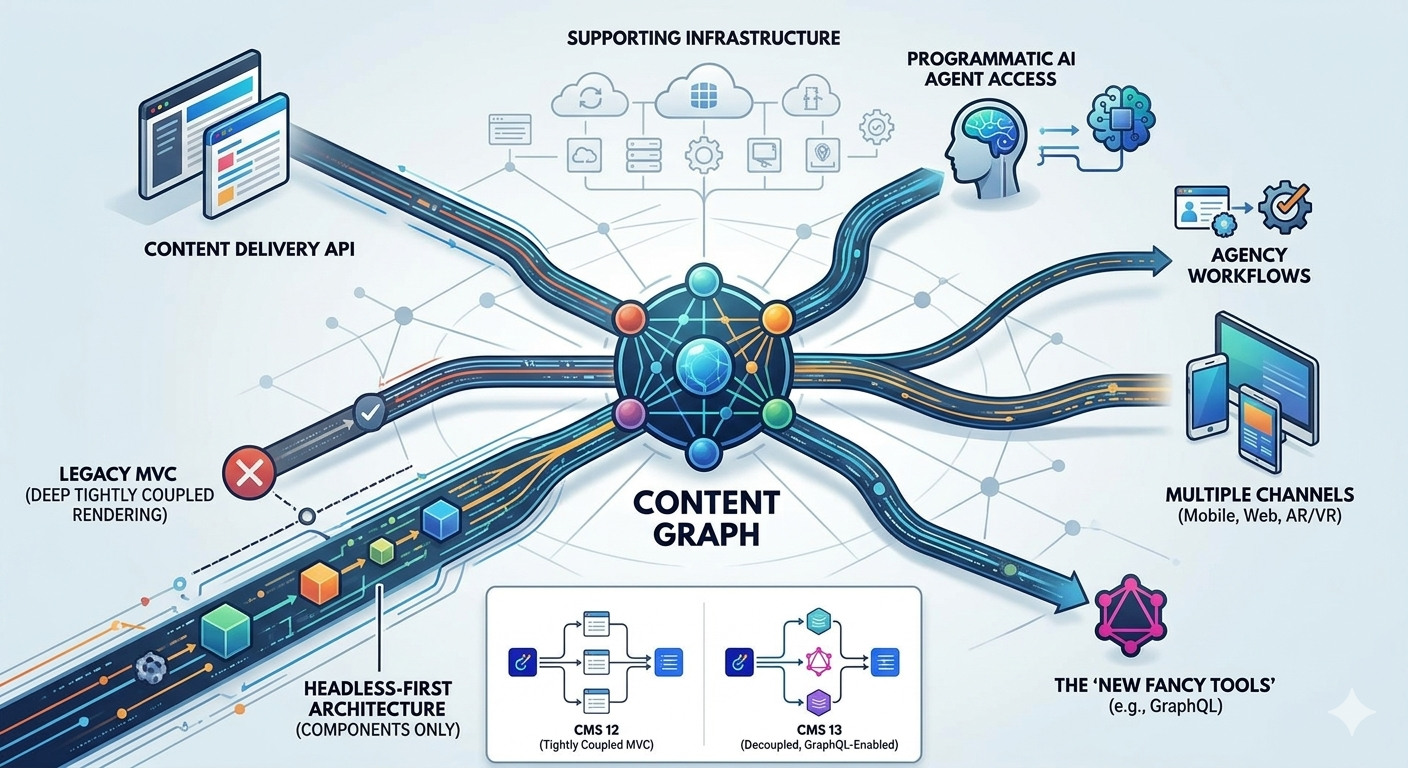
- For CMS 12 Users, The Visual Builder is genuinely different. The new Visual Builder supports both MVC and headless rendering modes and allows real inline editing with component-level re-rendering (in headless mode). Shared blocks work across both modes, but styling approaches differ. Styling options are built in at a component level, allowing changes to the style on the element versus the entire block.
- Contracts are a new concept in CMS 13. It is a way to define shared field structures that can be inherited across content types. Think of them like programming language interfaces for your content model. They're useful for defining base data shapes that multiple page or experience types share, and they feed directly into how Graph indexing works. For example, we all typically use the same UI for a date field. Imagine if you had a tag field on multiple types of content and you wanted the tag field to be used and treated in the same way, contracts are the answer.
- AI, oh yes, AI. Optimizely Opal will have context over where you are in the system and what you are trying to add, update, or delete. It will be ready to provide a helping hand.
Some Good news
This upgrade sounds far less painful than the last 3 major upgrades. We would need to rewrite some Find queries, if you made a service for that as a single responsibility class, then all the code will be in one place. If not, well, so much for clean code. The other major change that will need work is nested blocks. I know there are some of you out who built it, people asked for it, you may have warned against it, they may have even regretted it when they had to build a hundred of them, but the users of the system get a vote and how you have some work to do. All in all, easy day. Plus, if you are a dev, you get to play with the .NET 10 features and sling some Typescript around.

Industry Insights & Resources

Accelerating your B2B Commerce in the Optimizely Cloud
What Opticon 2024 Revealed About the Bold Future of Customer Experiences

How Opal is Transforming Marketing The AI That Actually Understands Your Business
